Bootstrap Templates Bundle

Showing posts with label HTML. Show all posts

Wednesday, June 19, 2019

Murphy - Home Maintenance & Repair Service HTML Template

Home Maintenance & Repair Service HTML Template

Murphy is a handyman repair service Bootstrap HTML Template. It is ideal for either all-rounders or professional teams to introduce their services; such as electrical service, plumbing, painting, door repair, roofing, drywall or interior maintenance. This premium HTML Template is not only good looking but also super functional to ready to be used as your handyman website, as soon as you purchase it.
Murphy includes 7 Homepage Demos, Services pages, Cost calculator page, Blog, contact us, Shop pages, etc. This template is fully responsive and supports all major browsers. Working contact form is included in this template, so you don’t need to purchase any script for the contact form.

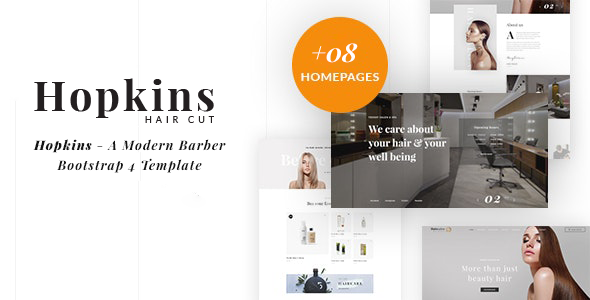
Barber Shop & Hair Salon HTML - Hopkins


Hopkins – A Modern Barber Bootstrap4 Template is created for hair salons, beauty salons, hairdresser, massage parlours day spas, medical business and beauty treatment businesses. Hopkins is very flexible & easy to use with tons of great features. Hopkins offers everything you need in a minimal, modular and amazing hair salon website. We have already studied over a hundred successful beauty websites and found out all interesting ingredients that make an awesome website in real life.
You know, it’s over 750,000 beauty salons over the world, and 80,000 is the US number. Are you one of them? Make it different to stand out – that’s Hair Salon.
The 08 Brand-new & Sexy Homepages for barber shop, hairdresser, and hair salon websites will just turn your business around and get more attention with beautifully designed sliders alongside aggressively powered-up template features.

Friday, December 28, 2012

How To Hyperlink Bookmark on the Same Page

This page shows the HTML code for making hyperlink bookmarks within the same page. This is achieved by using two different hyperlink codes. These hyperlink codes work together in pairs. One is the go-to target hyperlink and the other is the destination bookmark.

Hyperlink Bookmark Code

Insert the following HTML code into the part of the web document you want to bookmark:
Code
<a name="top"></a>
Now make a hyperlink that points to the bookmark:
Code
<a href="#top">Top of Page</a>

Output

Notes
In the above example, top is the name of the variable value. Name these anything you want.

If you want link to the other page just  change code by

<a href="http://www.hyperlinkcode.com/bookmark.php#top">Top of Page</a>

Wokiee React eCommerce Template